 UploadMyWalk
How to See Your Apple Watch Walks on a Map (No GPX Export Needed)
Updated 19 October 2026
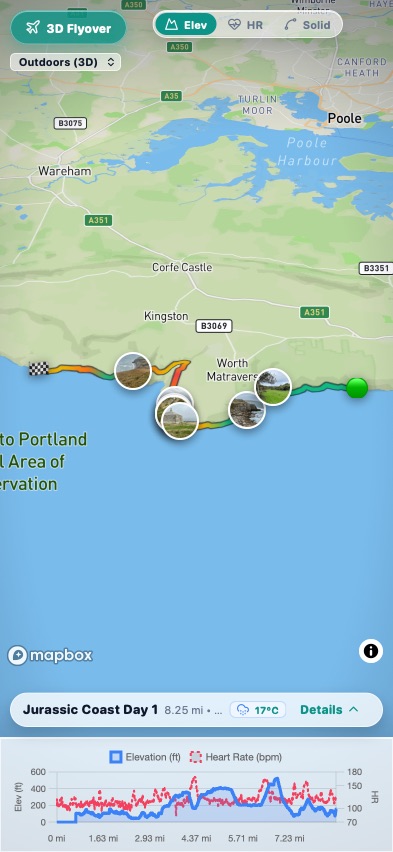
Every outdoor walk you record on your Apple Watch saves its route, but the Fitness app only shows each one as a small map, one walk at a time. There is no elevation chart on the map, no weather, and no way to see your walks together.
What you need
- Walks recorded as an Outdoor Walk or Hiking workout on your Apple Watch or iPhone, with location turned on so the route is saved.
- An iPhone with the UploadMyWalk app. The UploadMyWalk iPhone app is coming soon to the App Store.
Bring your walks in from Apple Health
- Open UploadMyWalk and create a free account.
- Tap Bring in my walks from Apple Health.
- UploadMyWalk explains what it reads and why. Tap Continue, then on Apple's screen tap Turn On All and Allow.
- Your walks arrive with their routes, heart rate and the weather at the time you walked. The first sync looks through your whole history.
- Tap any walk to see it on the 3D map, with its elevation profile and heart-rate chart underneath.
To keep your journal up to date without thinking about it, turn on Sync Automatically in Settings: new walks come in whenever you open the app.
On an iPad
Walks recorded on your iPhone or Apple Watch only reach an iPad's Health app when Health syncs through iCloud. On both devices open Settings, tap your name, then iCloud, and turn on Health. Give it a few minutes, then sync again.
On a computer instead
The website can't read Apple Health directly, so you'd need to export your walks as GPX files first. Our export guide shows how, then drop the files into UploadMyWalk.
Questions
Do I need to export GPX files from my Apple Watch?
No. The UploadMyWalk iPhone app reads your walks directly from Apple Health, routes and heart rate included.
Will it change anything in Apple Health?
No. UploadMyWalk only reads your walking workouts. It never writes to or changes Apple Health, and never shares your health data.
Does it bring in older walks?
Yes. The first sync looks through your whole history, not just recent weeks, so walks from years ago appear too.
Why is a walk missing its route?
Only outdoor walks recorded with location turned on have a route. Indoor walks have no route, so they are not brought in.
Try UploadMyWalk free
Every feature is free for up to 5 walks. The UploadMyWalk iPhone app is coming soon to the App Store. On a computer, bring in GPX, FIT or KML files on the website.
Get started freeSee an example walk in 3D